How to use the AI Traffic & Revenue Analytics?
See how much traffic, orders and revenue come from AI search and Google, and what StoreRank's articles and optimized products bring in.
Written By Tom van den Heuvel
Last updated 23 days ago
The Traffic & Revenue page shows how much traffic, orders and revenue your store gets from AI search (ChatGPT, Gemini, Claude, Perplexity and more) and Google Search. It also shows exactly what the articles and product improvements made by StoreRank are bringing in.
There's nothing to set up. StoreRank reads your Shopify analytics data, so the numbers match what Shopify sees.
You'll find it under StoreRank.ai → Traffic & Revenue.
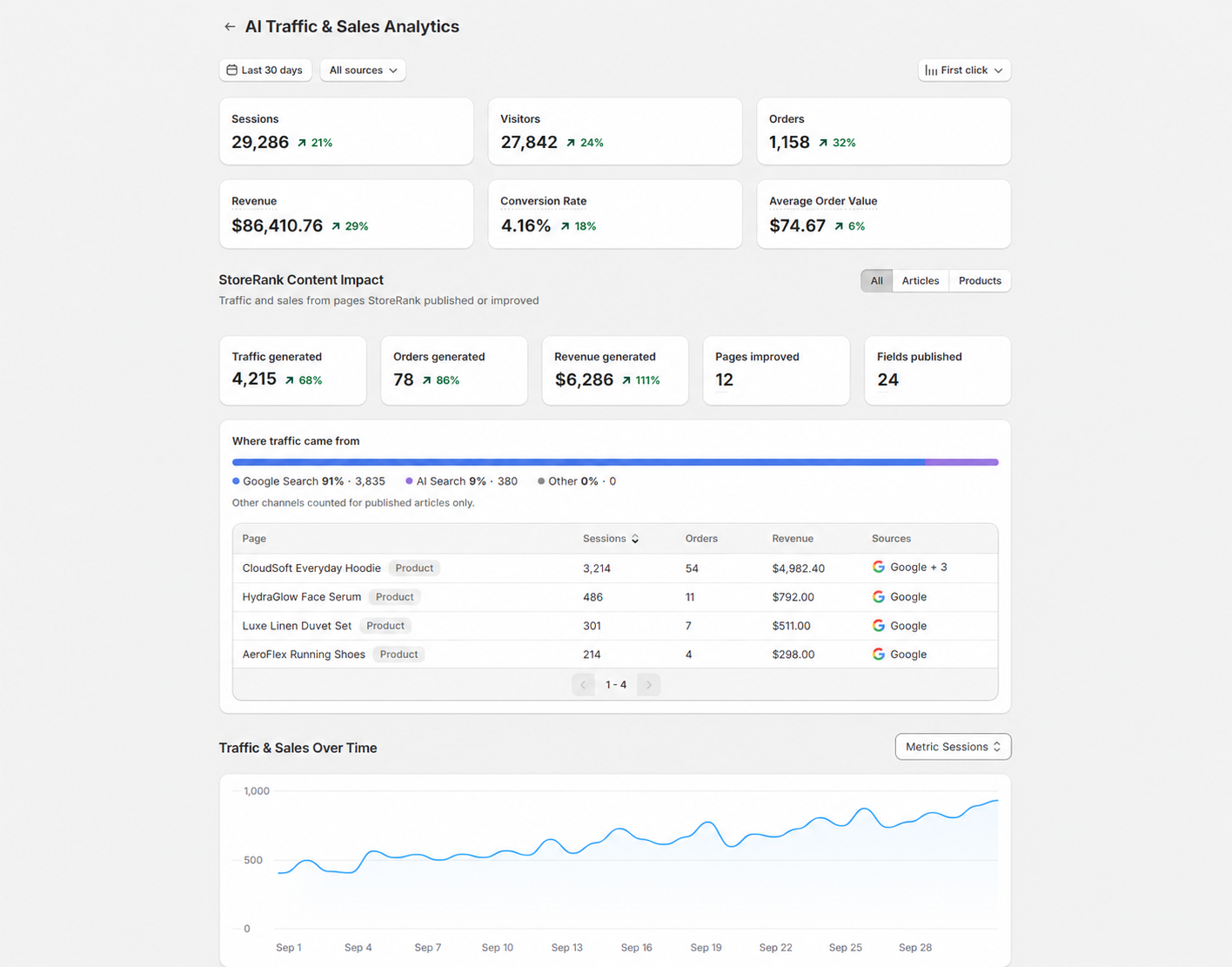
1. Filters at the top
Three controls at the top of the page change everything below them.
Date range
Pick the period you want to look at, for example the last 30 days. The small percentages next to each metric compare it with the previous period of the same length.
Sources
By default you see All sources. You can narrow it down to:
AI search: all AI platforms together
Organic search: Google Search
A single source, for example only ChatGPT or only Gemini
Attribution model
This decides which source gets credit for an order when a customer visited your store more than once before buying. You can choose any of the five models Shopify offers:
First click: credit goes to the source that first brought the customer to your store. Best for seeing which channels help people discover you, which is usually where AI search shines.
Last click: credit goes to the last visit before the purchase, including direct visits.
Last non-direct click: same as last click, but direct visits are skipped. This is Shopify's own default.
Any click: every source the customer clicked on before buying gets full credit for the order. Totals can add up to more than your real order count.
Linear: credit is split evenly over every source the customer clicked on.
Tip: AI search is often the first step in a buying journey. Someone asks ChatGPT for a recommendation, visits your store, and comes back later via Google or directly to buy. Switch between First click and Last non-direct click to see how big that role is for your store.
2. Key metrics
The six cards at the top show the totals for your selected period, sources and attribution model:
Sessions: number of visits
Visitors: number of unique people
Orders: orders credited to the selected sources
Revenue: revenue from those orders
Conversion rate: orders divided by sessions
Average order value: revenue divided by orders
3. StoreRank Content Impact
This section answers one question: what are the pages StoreRank created or improved bringing in?
It only counts two kinds of pages:
Articles published by the AI Article Autopilot
Products you optimized with the AI Product Optimizer (once the changes are live)
The cards
Traffic generated: sessions that started on one of these pages
Orders generated: orders where the customer first landed on one of these pages
Revenue generated: revenue from those orders
Pages improved: total number of articles published and products optimized
Fields published: total number of content fields StoreRank published, like titles, descriptions, meta tags, alt text and FAQs
Traffic, orders and revenue follow the date range you picked. Pages improved and Fields published always show your all-time total, because the traffic you see today comes from every page StoreRank ever improved, not just the ones from this period.
How we count traffic for articles vs products
We count these differently on purpose, so the numbers stay honest:
Articles count traffic from every channel (Google, AI search, social, email, direct, ads). The page didn't exist before StoreRank created it, so all traffic to it is new.
Products only count traffic from Google Search and AI search. A product page already got visits before it was optimized, for example from ads or direct visits. Those would have happened anyway, so we leave them out.
For products, tracking starts the moment the optimized content goes live. Traffic from before that date is not included.
Filter: All / Articles / Products
Use the toggle on the right to look at articles and products together or separately. The filter changes the whole section: the cards, the traffic bar and the page list.
Where traffic came from
The bar splits the section's traffic into Google Search, AI Search and Other. Other covers everything else, like direct visits, email and social, and is only counted for articles (see above). In the Products view you'll only see Google Search and AI Search.
Page list
Below the bar you see every StoreRank page that received traffic, with its type (Article or Product), sessions, orders, revenue and the sources that sent visitors.
Good to know: This section only covers content. Improvements StoreRank makes across your whole store, like schema markup, AI crawler access and your llms.txt file, help every page, so their effect shows up in the overall numbers on this page rather than in Content Impact.
4. Traffic & Sales Over Time
This chart shows your daily trend for the selected period. Use the Metric dropdown to switch between sessions, orders, revenue and the other key metrics. It's the quickest way to spot a spike after publishing new articles or a dip worth looking into.
5. Performance by source
This table breaks your traffic down per source, so you can compare AI platforms with each other and with Google Search. Sources include:
Google Search
ChatGPT
Shop (Shopify's Shop app)
Gemini
Claude
Perplexity
Meta AI
Grok
Copilot
Poe
DeepSeek
Other AI sources
For each source you see sessions, orders, revenue, CTR (the share of sessions that turned into an order) and average order value.
6. Performance by page
This table shows which pages people land on, which source sent them and what those visits turned into. Use it to find the products and pages that already work well in AI search and Google, so you know what to improve next.
Frequently asked questions
Why is my AI traffic lower than I expected?
Some AI apps don't tell your store where a visitor came from. Those visits show up as direct traffic in Shopify, and also here. So the AI numbers you see are a minimum: the real number is usually higher.
Why don't the Content Impact numbers match the totals at the top?
They measure different things. The totals cover all traffic from the selected sources. Content Impact only counts visits that started on a StoreRank article or optimized product, and for products only from Google and AI search.
I just optimized my products, why is Content Impact still empty?
Tracking for a product starts when its optimized content goes live, so it takes a few days to weeks before visits and orders build up. Articles also need time to get picked up by Google and AI platforms.
Which attribution model should I use?
Use First click to see which channels bring in new customers, and Last non-direct click if you want to match Shopify's own reports. There's no wrong choice, they just answer different questions.
Tips to get more out of it
Check in weekly and compare with the previous period to spot trends early.
Turn on auto-publishing in the AI Article Autopilot. Published articles are what feed Content Impact.
Optimize your best sellers first. Use Performance by page to find products that already get Google or AI traffic and give them the full treatment in the AI Product Optimizer.
Compare AI platforms. If one platform converts much better, check the AI & Search Visibility page to see which prompts you show up for there.
Was this helpful?
Still need help? Ask the team