How to filter on your Best-Selling Products first in the AI Content Optimizer
Written By Tom van den Heuvel
Last updated 2 months ago
If you want to optimize your highest-performing products first, Shopify doesn’t provide a built-in “best sellers” filter inside apps. However, there’s a simple and effective workaround:
Create a collection sorted by Best selling, then use that collection inside StoreRank.ai’s AI Content Optimizer.
This allows you to focus your AI optimization efforts on the products that already drive the most sales or have the highest potential impact.
Why prioritize best sellers?
Your best-selling products typically:
Have strong conversion rates
Benefit most from improved descriptions, FAQs, schema, and metadata
Are more likely to be recommended by AI platforms once optimized
Generate an immediate revenue uplift when improved
Using a dedicated collection ensures you can quickly filter and optimize them in bulk.
Step 1: Create a Best-Selling Products Collection in Shopify

1. Go to Shopify Admin → Products → Collections
Click Create collection.
2. Choose the collection type
You can use either:
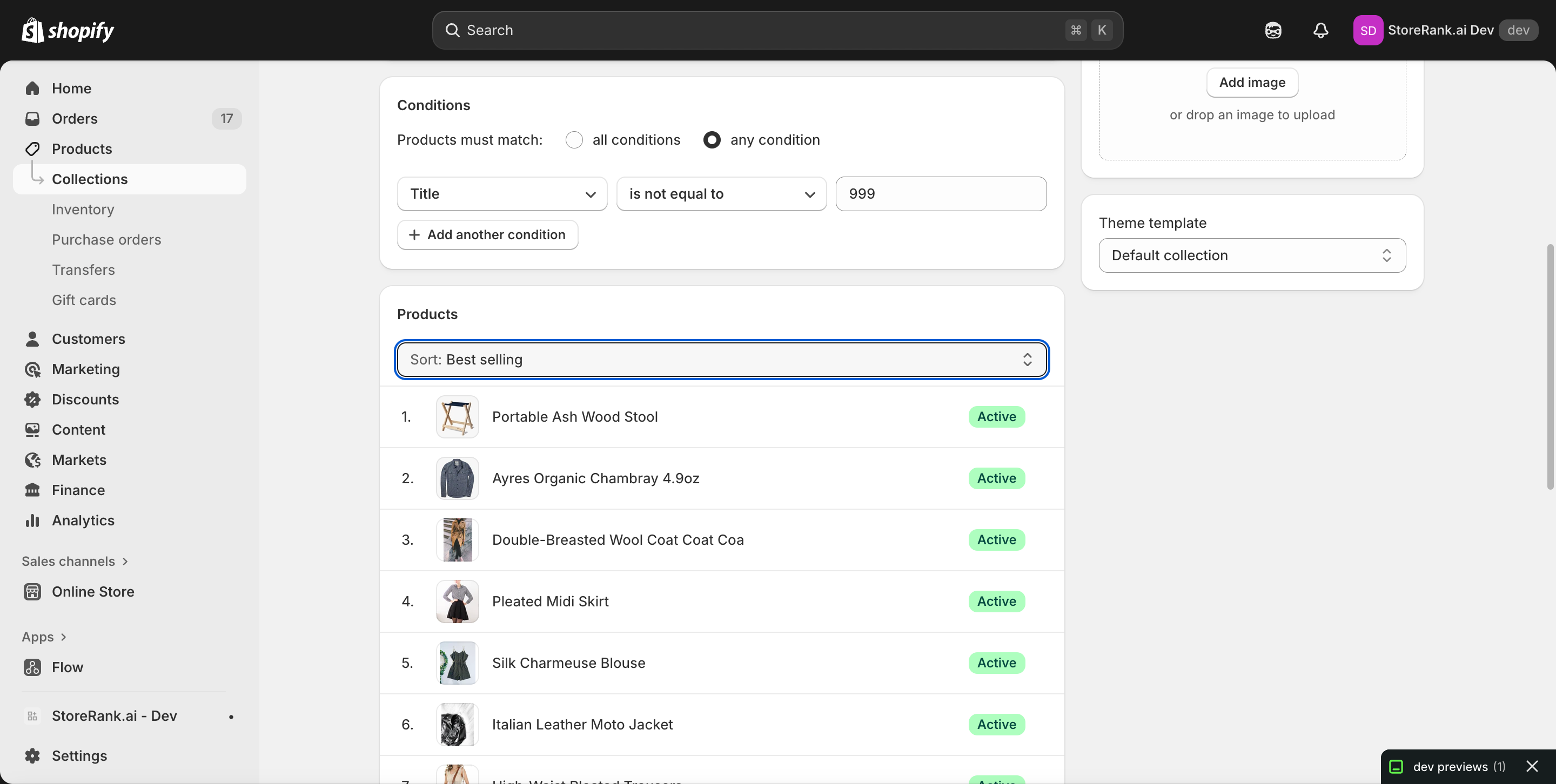
Option A — Automated Collection (Recommended)
Use this if you want all products included automatically.
Set “Products must match” to any condition
Add a condition such as:
Title → is not equal to → 999
(This simply includes all products; any always-true condition works.)
Option B — Manual Collection
Choose this if you want to handpick a specific group of top sellers.
3. Set the sorting to “Best selling”
Scroll to the Products section of the collection editor.
In the Sort dropdown, choose:
👉 Best selling
This tells Shopify to sort the products inside this collection based on Shopify’s sales performance ranking.
4. Save the collection
Your new Best-Selling collection is now ready.
Step 2: Use This Collection in the AI Content Optimizer
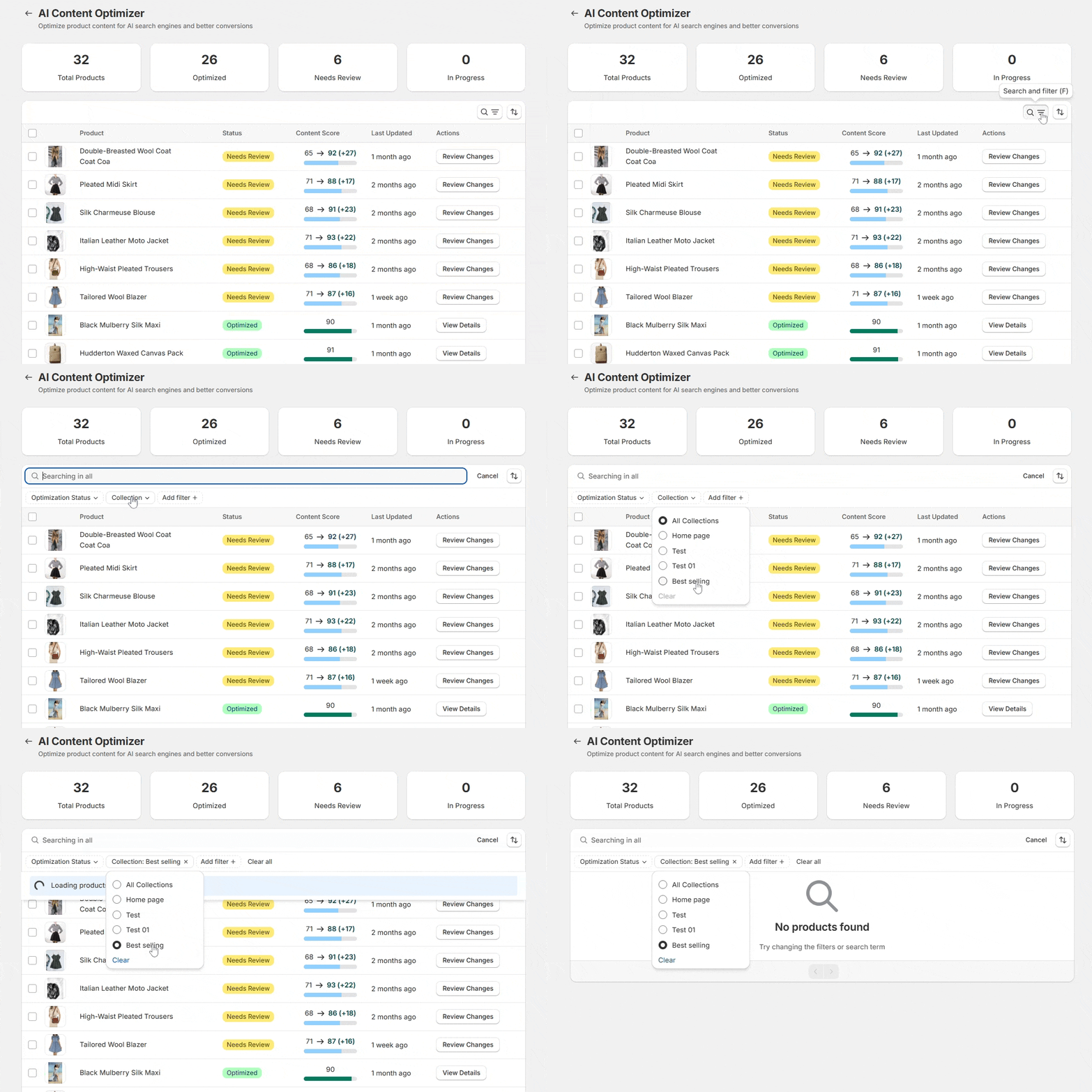
1. Open StoreRank.ai → AI Content Optimizer
2. Use the filters panel to select your Best-Selling collection
Collections from your Shopify store appear automatically in the filter options.

3. Start optimizing
You can now run bulk or individual optimizations on:
Product titles
Product descriptions
Meta titles & descriptions
Alt text
AI-generated FAQs
Schema enhancements
Your best sellers will be the only products displayed — making prioritization effortless.
Important Notes
Shopify’s “Best selling” logic
Shopify ranks products based on all-time sales volume, not recent sales or revenue.
This works well for general best-seller optimization. If you need “recent top performers,” a custom tagging workflow or analytics tool would be required.
Safe for your theme
Sorting inside a collection does not affect your live storefront unless that specific collection is displayed somewhere. It only affects internal organization and filters.
Works automatically with StoreRank.ai
Once the collection exists, StoreRank.ai can filter and optimize it immediately — no additional setup needed.
Need help?
If you need assistance setting this up or want help prioritizing the right products, feel free to contact support anytime — we’re happy to take a look at your store setup.