How does the Schema Markup Setup work?
Schema markup provides structured data that helps AI platforms understand and accurately cite your business information.
Written By Tom van den Heuvel
Last updated 12 months ago
What is Schema Markup?
Schema markup is structured data code that tells search engines and AI platforms what your content means, not just what it says. It helps AI understand:
What products you sell and their specifications
Your business information and credibility
Product reviews and ratings
Pricing and availability
Related products and recommendations
StoreRank.ai Schema Types
OnlineStore Schema (Homepage):
Business name, description, and contact information
Social media profiles and external links
Founded date and business category
Logo and brand imagery
Customer service contact points
Product Schema (Product Pages):
Product name, description, and specifications
Pricing, currency, and availability
Product images and variants
Brand and manufacturer information
Related products and collections
Customer reviews and ratings (when available)
WebSite Schema (Site-wide):
Site search functionality
Sitelinks and navigation structure
Organization relationship
Article Schema (Blog Posts):
Article headline and content
Author and publisher information
Publication and modification dates
Article images and featured media
ContactPage Schema (Contact Pages):
Business location and contact details
Customer service information
Business hours and availability
FAQ Schema (Product and Info Pages):
Frequently asked questions
Structured question-answer pairs
Voice search optimization
Schema Configuration
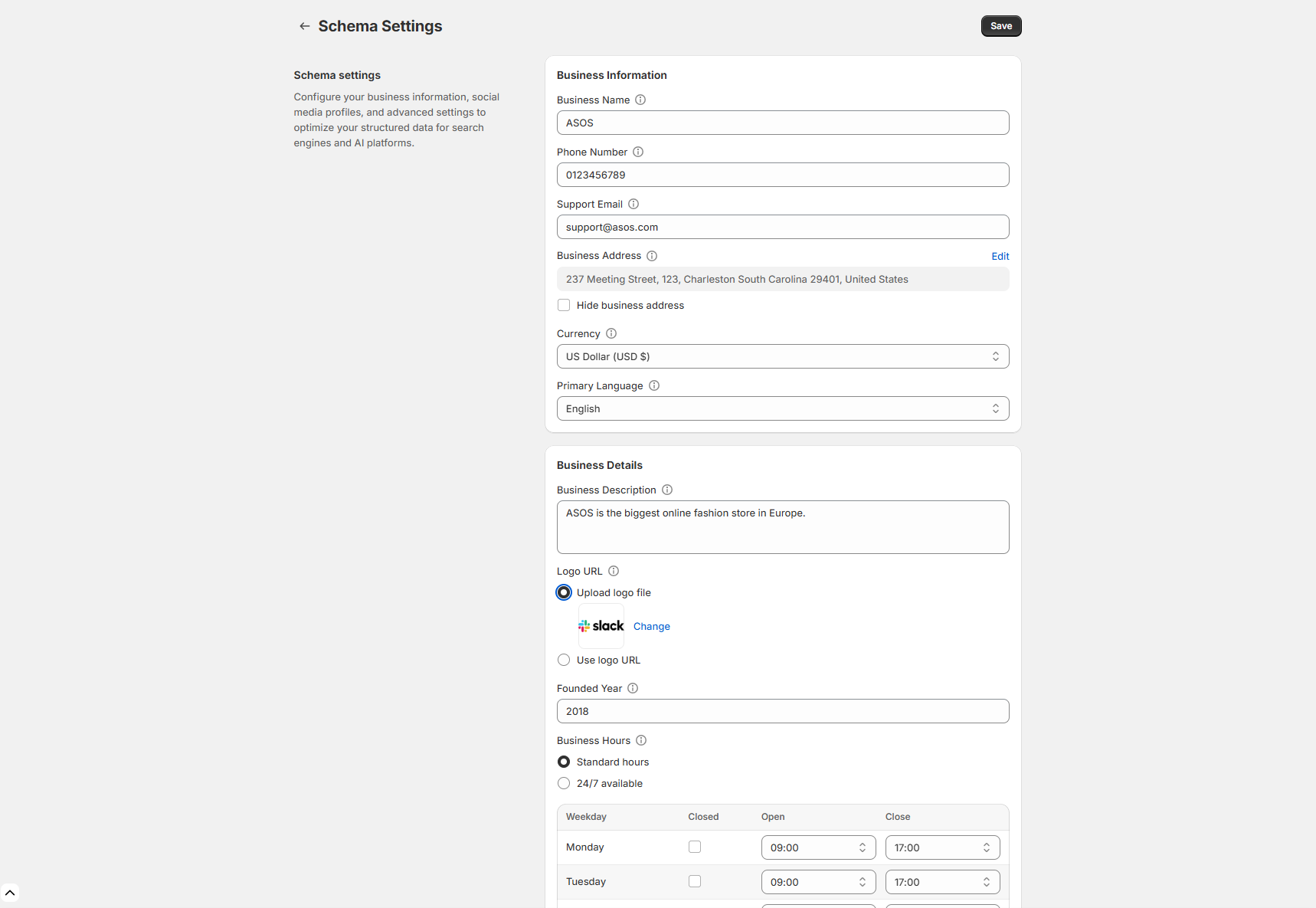
Business Information Setup
Navigate to Settings > Schema Settings
Complete all business information fields:
Business Name: Your official business name
Business Description: Clear description of what you do
Phone Number: Primary business phone
Support Email: Customer service email
Business Address: Physical location (optional)
Business Hours: Operating hours with timezone
Founded Year: When your business was established
Primary Product Category: Main product category
Social Media Integration
Add all relevant social media profiles:
Facebook Business Page URL
Instagram Business Profile URL
Twitter/X Business Account URL
YouTube Channel URL
LinkedIn Company Page URL
TikTok Business Account URL
Pinterest Business Profile URL
Advanced Settings
Review App Integration: Select your review app for automatic rating schema:
Judge.me
Yotpo
Loox
Okendo
Stamped.io
Reviews.io
Product Categories:
Primary business category
Secondary categories if applicable
Industry-specific classifications
Shipping and Service Areas:
Countries and regions you serve
Shipping options and timeframes
Service area specifications
Common Schema Errors
Missing Required Fields:
Business name or description
Product pricing or availability
Contact information
Image URLs or alt text
Invalid Data Formats:
Incorrect date formats
Invalid currency codes
Malformed URLs
Missing schema.org context
Duplicate Schema:
Conflicting organization schema from themes
Multiple product schemas on same page
Overlapping business information
Schema Benefits for AI
Improved AI Understanding:
Clear product categorization and features
Accurate business information for citations
Structured pricing and availability data
Related product relationships
Enhanced AI Citations:
Authoritative business information
Specific product details and specifications
Customer review integration
Professional presentation in AI responses
Better AI Recommendations:
Clear product relationships and alternatives
Accurate availability and pricing
Detailed feature comparisons
Trust signals through structured reviews
Technical Implementation
StoreRank.ai automatically implements schema through:
Direct Shopify Integration:
Theme-agnostic implementation
No conflicts with existing themes
Automatic updates with product changes
Performance-optimized loading
Dynamic Data Population:
Real-time product information
Automatic inventory updates
Price change synchronization
Review score integration
Validation and Monitoring:
Continuous schema validation
Error detection and alerts
Google Rich Results Test integration
Performance impact monitoring
Measuring Schema Success
Technical Metrics:
Schema validation pass rate (target: >98%)
Page coverage percentage (target: 100%)
Error resolution time
Loading performance impact
Business Impact:
Improved AI mention frequency
Enhanced brand authority in AI responses
Increased click-through rates
Better product understanding by AI
Want to enable/disable a specific Schema type?
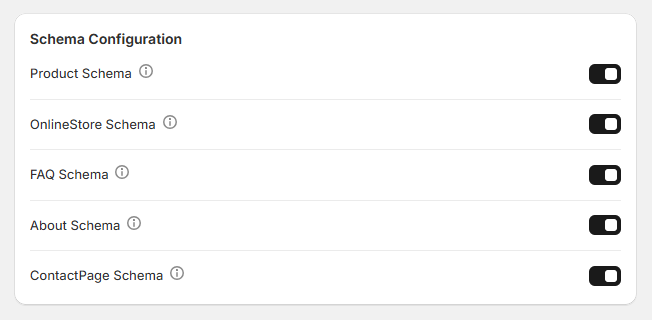
Are you already using another plugin for certain Schema types? Or does your theme cover some of these? You can easily enable and disable all Schema types in the Schema settings.