How does the AI Crawler Access (llms.txt) work?
Ensure AI platforms can discover, crawl, and understand your store content through proper crawler access configuration.
Written By Tom van den Heuvel
Last updated 12 months ago
What is llms.txt?
llms.txt is a standardized file that provides AI crawlers with a directory of your most important content. It serves as a roadmap for AI platforms, highlighting:
Your most valuable products and collections
Key business pages (shipping, returns, FAQ)
Content priorities and categories
Store information and contact details
Why AI Crawler Access Matters
Discoverability: Help AI platforms find your best content
Prioritization: Guide crawlers to your most important pages
Efficiency: Reduce crawler resources while maximizing coverage Control: Specify what content you want AI platforms to focus on
llms.txt Configuration
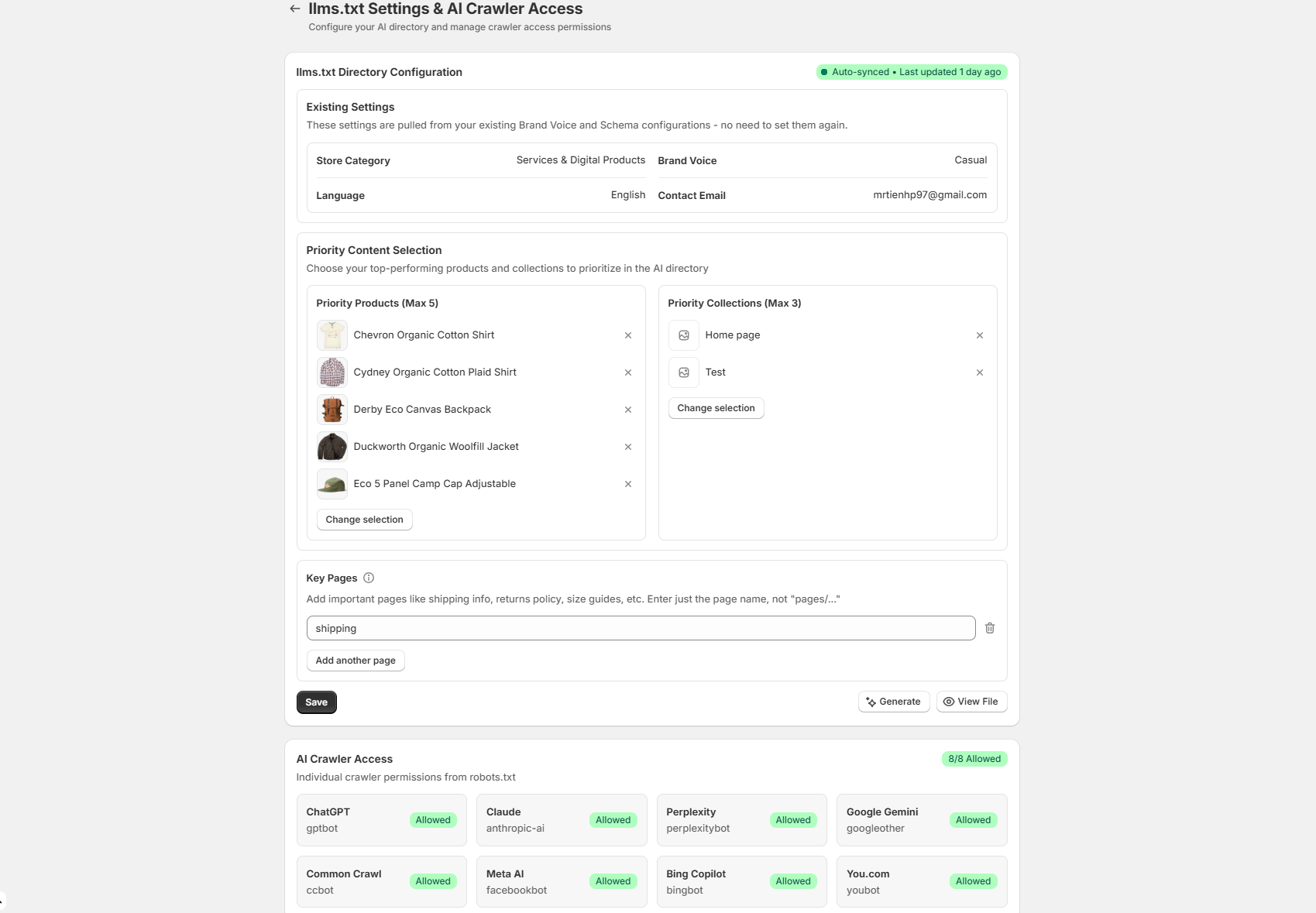
Accessing the Settings
Go to Settings > AI Crawler Access
Review the llms.txt Directory Configuration section
Note the auto-sync status and last update timestamp
Existing Settings Integration
The system automatically pulls information from:
Schema settings (business info, contact details)
Brand profile (category, voice, language)
Store configuration (currency, policies)
Priority Content Selection
Priority Products (Max 5): Choose your best-performing or most representative products:
Best sellers with strong reviews
Flagship or signature products
Products with comprehensive descriptions
Items with competitive advantages
Priority Collections (Max 3): Select collections that represent your brand:
Main product categories
Seasonal or featured collections
Best-selling product groups
Key Pages: Add important informational pages:
Shipping and delivery information
Returns and exchange policies
Size guides and fitting information
FAQ and customer support
About us and brand story
Auto-Generation Features
Automatic Updates:
Regenerates when products or collections change
Updates when business information is modified
Refreshes schema settings integration
Maintains current timestamp
Content Validation:
Ensures all links are accessible
Validates product and collection availability
Checks page existence and accessibility
Removes broken or outdated links
Crawler Permission Management
Supported AI Crawlers
ChatGPT:
User-agent: GPTBot
Crawling behavior: Comprehensive content analysis
Update frequency: Regular crawling cycles
Claude:
User-agent: anthropic-ai
Crawling patterns: Focused content extraction
Processing: Text-heavy content analysis
Perplexity:
User-agent: PerplexityBot
Methodology: Real-time content access
Focus: Current information and availability
Google Gemini:
User-agent: GoogleOther
Integration: Google ecosystem alignment
Scope: Comprehensive site understanding
Meta AI:
User-agent: FacebookBot
Social integration: Profile and product linking
Platform: Instagram and Facebook integration
Bing Copilot:
User-agent: BingBot
Microsoft integration: Office and browser compatibility
Scope: Productivity-focused content access
All other AI Crawlers:
Allowed by default
Access Status Monitoring
The crawler access section shows individual crawler permissions:
Allowed Status: Crawler has full access to your content
Blocked Status: Crawler is restricted from accessing content
Limited Status: Partial access with specific restrictions
Unknown Status: Crawler permission unclear or not configured
llms.txt Content Structure
The generated file includes:
Header Information
# LLM Crawler Guidelines # Store: [Your Store Name] # Category: [Primary Business Category] # Language: [Content Language] # Updated: [Current Date]Priority Content Sections
Allow: /products/* Allow: /collections/* Allow: /pages/* Priority-Pages: - /products/[priority-product-1] - /products/[priority-product-2] - /collections/[priority-collection-1] - /pages/shipping - /pages/returnsBusiness Context
Store-Description: [Business description from schema] Contact: [Customer service email] Brand-Voice: [Configured brand tone] Primary-Category: [Product category]Best Practices
Content Selection:
Choose products with detailed, accurate descriptions
Include items with competitive advantages
Select collections representing your brand range
Add pages that build trust and authority
Update Frequency:
Review priority selections monthly
Update when launching new key products
Refresh seasonal or promotional priorities
Remove discontinued or outdated items
Monitoring and Optimization:
Check crawler access status weekly
Monitor which content gets crawled most
Adjust priorities based on AI mention performance
Validate that priority content drives results