How to use AI & Search Visibility?
See where your store shows up in ChatGPT, Gemini, Claude, Perplexity, Google AI Overviews and Google Search, who gets recommended instead, and which sources AI trusts.
Written By Tom van den Heuvel
Last updated 11 days ago
AI & Search Visibility shows where your store appears when people ask AI assistants for recommendations, and how you perform in Google Search. All in one place.
It answers questions like:
Do ChatGPT, Gemini, Claude, Perplexity and Google AI Overviews recommend my brand?
In what position, and how do they talk about us?
Which competitors show up instead?
Which websites does AI use as sources when it answers?
How am I doing in Google Search?
You'll find it under StoreRank.ai → AI & Search Visibility. This feature was previously called the AI Mentions Tracker.
How it works
You track prompts. These are questions your customers ask AI assistants, like "best baby shampoo for cradle cap?" or "Brand A vs Brand B, which to buy?". When you set up StoreRank, we suggest prompts based on your store, products and competitors. You can add, edit or remove them at any time.
We ask the AI platforms. StoreRank runs every prompt on ChatGPT, Gemini, Claude, Perplexity and Google AI Overviews, and saves the full answers.
We analyze every answer. For each response we check if your brand is mentioned, in which position, with what sentiment, which competitors appear, and which sources the AI cited.
Everything you see is based on real AI answers. No estimates or made-up scores.
Navigating the page
The menu on the left has three parts:
Overview: a summary of everything, AI and Google together
AI Search: Prompts, Platforms, Query Fan-Out, Citations, Competitors and Responses
Google Search: Overview, Keywords, Pages, AI Queries and Geography
At the top right you can change the date range and open Configuration for your tracking settings.
Overview
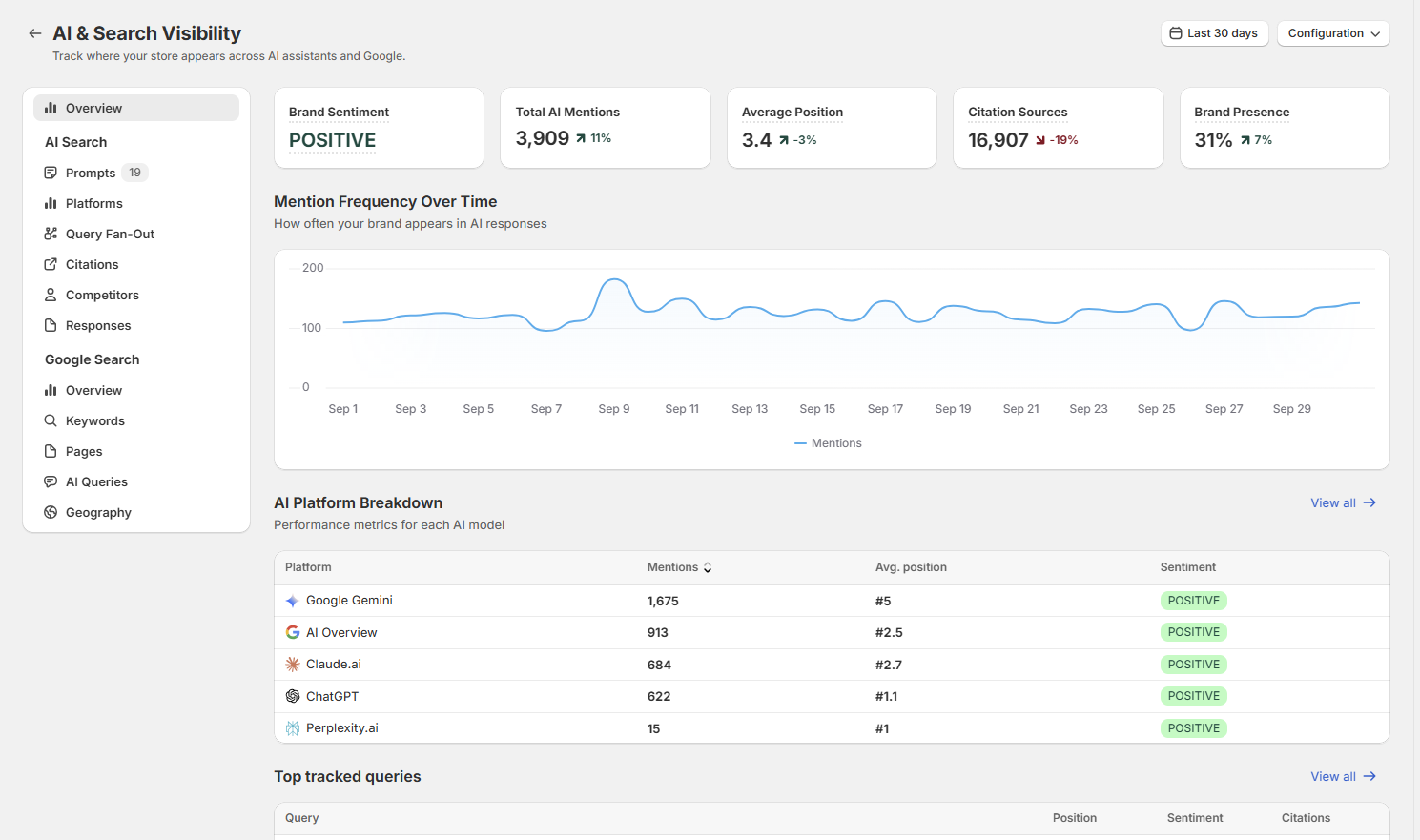
The Overview gives you the full picture on one screen. Each block has a View all link that takes you to the detailed page.
Key metrics
Brand Sentiment: how AI describes your brand overall (positive, neutral or negative)
Total AI Mentions: how often your brand was mentioned across all AI answers
Average Position: where your brand shows up in AI answers on average. #1 means you're mentioned first. Lower is better.
Citation Sources: the total number of sources AI cited in its answers to your prompts
Brand Presence: the share of AI answers your brand appears in. This is the clearest single number for your AI visibility.
The small percentages compare the selected period with the previous period of the same length.
Mention Frequency Over Time
A daily chart of your brand mentions. Use it to spot trends, for example after publishing new articles or optimizing products.
AI Platform Breakdown
Mentions, average position and sentiment per platform. You'll often see big differences: you might be #1 in ChatGPT and #5 in Gemini. That tells you where to focus.
Top tracked queries
Your most important prompts, with your position, sentiment and number of citations. The small badges under each prompt show how many mentions you got per platform.
Top citation sources
The websites AI cites most often when answering your prompts, and for how many of your prompts. Expand a row to see the exact pages.
Top competitors
How often other brands are mentioned and their average position, next to your own brand (marked You).
Google Visibility
Your Google clicks, impressions, CTR and average position, plus your top keywords and top pages. This needs Google Search Console to be connected (see below).
AI Search
Prompts
This is where you manage the questions you track. The number next to Prompts shows how many you're tracking. How many you can track depends on your plan.
For each prompt you see your position, sentiment, mentions per platform and the number of citation sources. Click a prompt to see the details.
What makes a good prompt?
Write it like a real question. "best eczema cream safe for babies?" works better than "eczema cream".
Mix different types: category questions ("best [category] brands?"), comparisons ("[you] vs [competitor]?"), alternatives ("alternatives to [competitor]?"), use cases ("best [product] for [need]?") and where-to-buy questions.
Include prompts you don't win yet. If you only track prompts where you're already #1, you can't see progress. Prompts where you're absent or low show you where to grow.
Keep branded prompts limited. Prompts with your brand name in them will almost always mention you. They're useful for checking sentiment, but don't say much about discovery.
Platforms
A deeper look at each AI platform: ChatGPT, Google Gemini, Claude, Perplexity and Google AI Overviews. Compare mentions, average position and sentiment per platform, and see which prompts you win or lose on each one.
Query Fan-Out
Before AI assistants answer a question, they often run their own web searches first. For example, to answer "best baby shampoo for cradle cap?", ChatGPT might search for "cradle cap shampoo pediatrician recommended" and "gentle baby shampoo reviews".
Query Fan-Out shows these hidden searches for your tracked prompts, per platform. This tells you what AI actually looks for when it decides who to recommend. Great input for new articles, FAQs and product content.
Citations
The websites and pages AI uses as sources when it answers your prompts. This is often the most valuable data on the page.
AI doesn't make up recommendations, it bases them on content it finds and trusts: review sites, Reddit threads, comparison articles, retailers, brand websites. If you're mentioned positively in those sources, AI is more likely to recommend you.
See which domains are cited most, and for how many of your prompts
Expand a domain to see the exact pages that were cited
Check if your own site is in the list, and which of your pages get cited
Competitors
Every brand that shows up in AI answers to your prompts, with total mentions and average position. Use it to see who AI recommends instead of you, and on which prompts. For more tips, read How to use Competitor Analysis.
Responses
The full answers each AI platform gave to your prompts. Read these to understand how AI talks about your brand: what it praises, what it criticizes, and why it picks a competitor over you.
Google Search
The Google Search section shows your performance in Google, next to your AI visibility. It uses data from Google Search Console.
Connecting Google Search Console
Open any Google Search page and click Connect Google Search Console. Sign in with the Google account that has access to your Search Console property and approve access. It takes about a minute, and your data will appear shortly after. Until you connect, these pages stay empty.
Overview
Your Google clicks, impressions, CTR (click-through rate) and average position, with the change compared to the previous period.
Keywords
All keywords your store ranks for in Google, with clicks, impressions, CTR and position.
Pages
Which pages on your store get the most Google clicks, and where they rank.
AI Queries
The long, conversational searches people type into Google, like full questions. These are the type of searches that often trigger Google AI Overviews. You see the exact phrases people used, with impressions and clicks. Great for finding real customer questions to answer in articles, FAQs or new prompts to track.
Geography
Where your Google traffic comes from, per country.
How to use the data
1. Get into the sources AI trusts
Go to Citations and look for sites that are cited often, where your competitors are mentioned and you're not. That's your list of opportunities:
Review and comparison sites: reach out to the author, offer samples or expert input
Reddit and forums: join relevant discussions with genuinely helpful answers
Review platforms: ask happy customers to leave reviews, and respond to all reviews
2. Close content gaps
Use Query Fan-Out and AI Queries to find the questions AI and shoppers are searching for. If your store doesn't have a page that answers them, create one with the AI Article Autopilot, or add the answer to your product FAQs with the AI Product Optimizer.
3. Learn from your competitors
Find prompts where a competitor ranks above you. Read the Responses to see why AI prefers them, and check Citations to see which sources mention them.
4. Combine AI and Google
Strong on Google, missing in AI? Those pages already have authority. Make sure they're well structured, with clear answers and FAQs, so AI can use them.
Recommended by AI, weak on Google? There's demand for you. Create content that also targets the matching Google searches.
5. Keep an eye on sentiment
If sentiment turns neutral or negative on a platform, read the Responses to find the cause, like complaints about shipping or price, and address it at the source.
Frequently asked questions
Why do my numbers differ per platform?
Every AI platform uses its own data, sources and way of searching the web. It's normal to rank well on one and lower on another.
Why did my position change while I didn't change anything?
AI answers aren't fixed. The same question can get a slightly different answer each time, and platforms update their models and sources regularly. Look at trends over weeks, not single days.
Why are the Google pages empty?
You need to connect Google Search Console first. See Connecting Google Search Console above.
Can I track more prompts?
The number of prompts you can track depends on your plan. You can upgrade anytime under Settings.
Tips
Check the Overview weekly and look at the trend, not the daily numbers.
Review your prompts every few months. Add new products, remove prompts that no longer matter.
Make sure your schema and AI crawler access are active, so AI platforms can read your store.
Turn on auto-publishing in the AI Article Autopilot, so new content keeps filling the gaps you find here.
Check Traffic & Revenue to see the visits and sales that AI and Google actually bring in.
Was this helpful?
Still need help? Ask the team