Content Settings for AI Product Optimizer
Control what the AI Product Optimizer generates, how much, and what gets published automatically.
Written By Tom van den Heuvel
Last updated 21 days ago
Find these under AI Product Optimizer → Settings. Changes apply to future runs only; nothing already published gets rewritten.
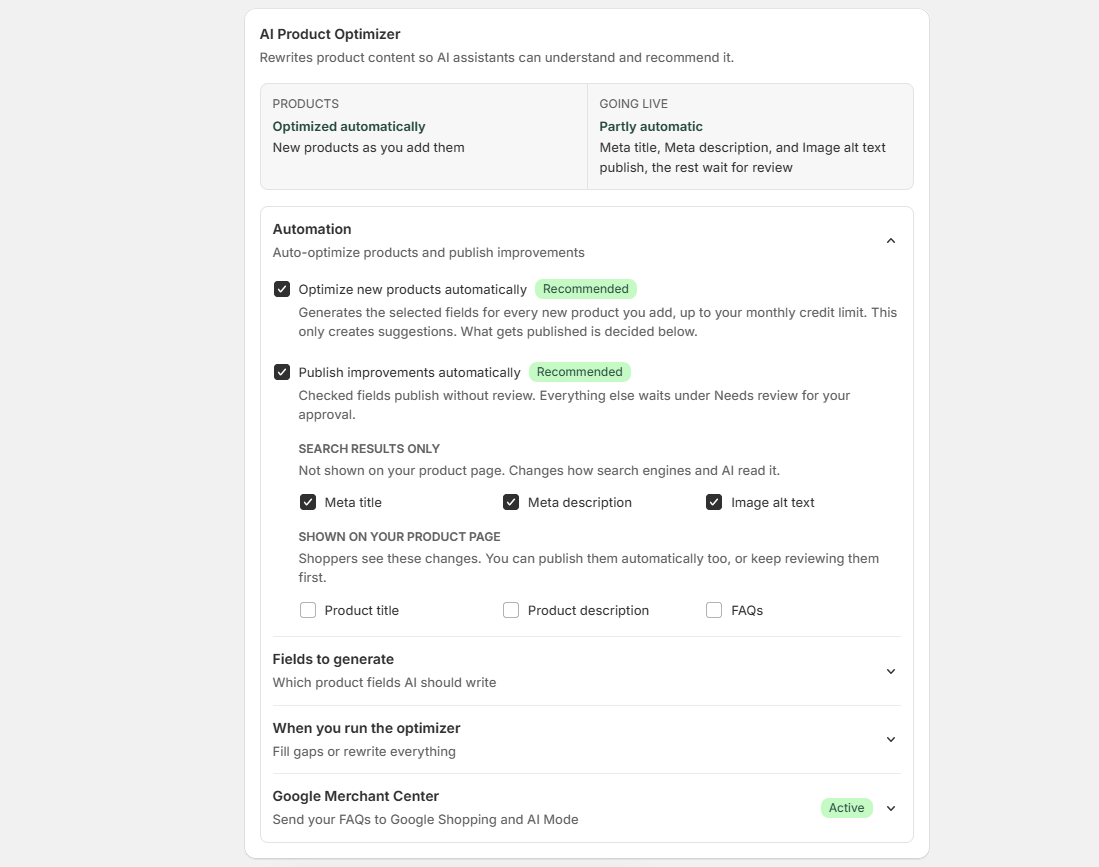
Automation
Two separate switches:
Optimize new products automatically: generates content for each new product you add, up to your monthly credits. It only creates suggestions.
Publish improvements automatically: publishes the fields you tick without review. Unticked fields wait under Needs Review.
Example, with both on and our recommended fields ticked: you add a product → StoreRank generates its content → meta title, meta description, and alt text go live → title, description, and FAQs wait for your review.
Important: Autopilot only handles new products. To optimize existing products, select them in the AI Product Optimizer and click Optimize Selected.
Fields to generate
Switch each field on or off: product title, product description, meta title, meta description, image alt text, and FAQs. This applies to manual runs and Autopilot.
Product description length: Standard (200–350 words) works for most stores.
FAQs per product: up to your plan's limit. More FAQs give AI more context but use more credits.
Base FAQs on real search questions: builds FAQs around questions people actually search for, instead of generic ones.
When you run the optimizer
Fill gaps only (recommended): only rewrites fields that fail a check. A product with a great description but missing alt text only gets alt text. Saves credits and keeps your good content.
Rewrite everything: regenerates every selected field, even ones that pass. Useful after a rebrand. Uses more credits.
Recommended setup
✅ Optimize new products automatically
✅ Publish improvements automatically, for meta title, meta description, and image alt text only
✅ All fields to generate
✅ Standard description length
✅ Base FAQs on real search questions
✅ Fill gaps only
This keeps new products optimized automatically, while anything shoppers see stays under your control.
Was this helpful?
Still need help? Ask the team