How does AI Search Indexing work?
Tell AI-powered search engines the moment your products or pages change, so they don't work with outdated info.
Written By Tom van den Heuvel
Last updated 10 days ago
Normally, search engines find your changes whenever they happen to crawl your store again, which can take days or weeks. AI Search Indexing tells them right away: every time a product or page changes, StoreRank pushes the URL to them through IndexNow.
Why it matters for AI: IndexNow feeds Bing, and Bing's index is used by Microsoft Copilot and is one of the sources behind ChatGPT search. So new products, prices, and content reach AI answers faster.
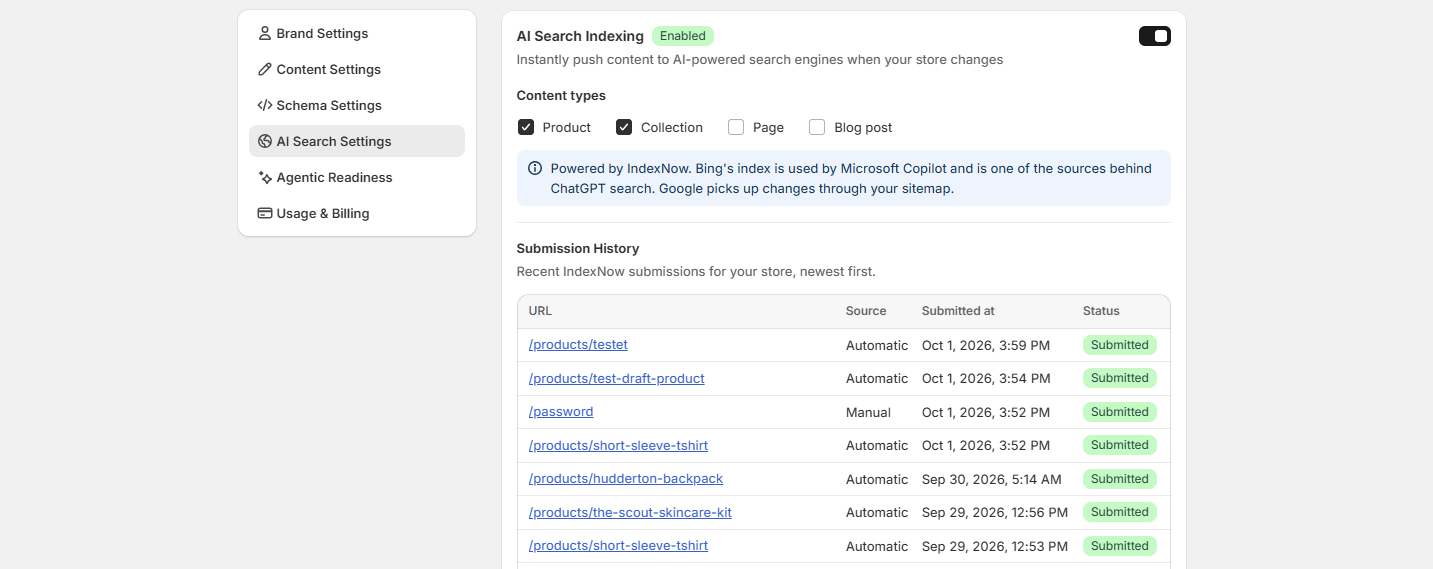
How to set it up
Go to Settings → AI Search Settings and scroll to AI Search Indexing (below llms.txt).
Switch it on.
Under Content types, tick what you want pushed: Product, Collection, Page, and Blog post.
That's it. From now on, changes to those content types are submitted automatically.
Check what was submitted
Submission History lists your most recent submissions, newest first: the URL, whether it was sent automatically or manually, when, and its status.
Good to know
Submitted doesn't mean indexed. It means the search engine was notified. It still decides when to crawl the page and whether to show it.
Google doesn't use IndexNow. Google picks up your changes through your sitemap, which Shopify keeps up to date for you.
Was this helpful?
Still need help? Ask the team