How to activate AI Search Indexing (IndexNow)
Signed up before October 9, 2026? Update your app proxy URL in Shopify to turn on AI Search Indexing. It takes a minute.
Written By Tom van den Heuvel
Last updated 3 days ago
Only for existing users: you need this if you signed up before October 9, 2026. Signed up on or after that date? You're all set, no changes needed.
To use AI Search Indexing, you need to change one setting in Shopify: the app proxy URL for StoreRank.ai. It has to end in /apps/storerankai. It takes about a minute.
Step 1: Open Manage app
In your Shopify admin, go to Apps and open StoreRank.ai.
Click the three dots (•••) in the top-right corner.
Click Manage app.

Step 2: Click Customize URL
Scroll down to App Proxy URL and click Customize URL.
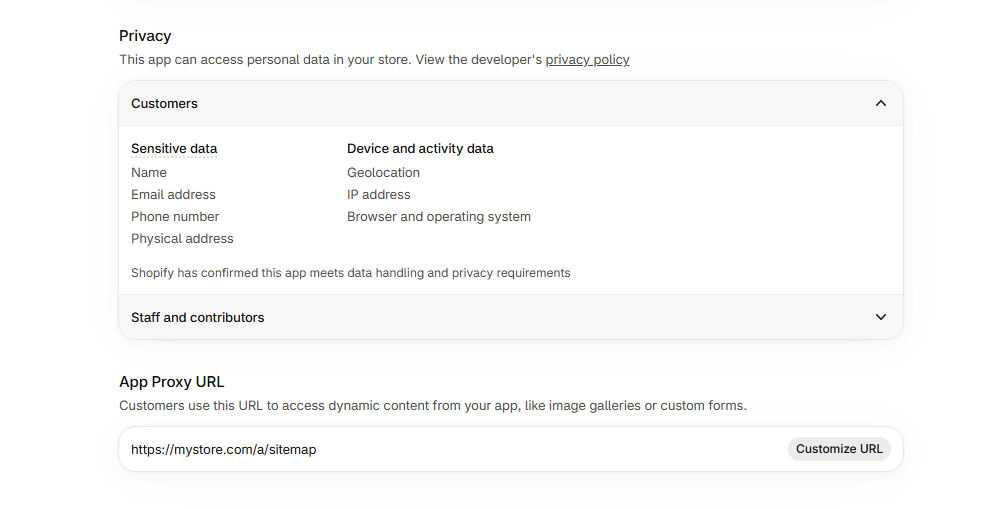
Step 3: Set the new URL
A popup opens with a dropdown and a text field.
In the dropdown, select the option that ends in
/apps/.In the text field next to it, type
storerankaiClick Save.
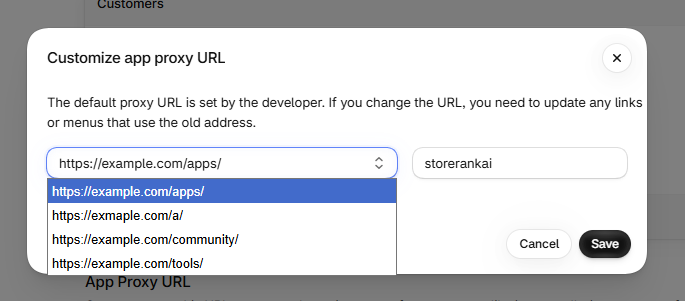
Important: type
storerankaiexactly like this: all lowercase, no spaces, no slash in front.
Step 4: Check the result
The App Proxy URL should now look like this, with your own store domain:
https://your-store.com/apps/storerankai
Then go back to StoreRank and open Settings → AI Search Settings to make sure AI Search Indexing is switched on. More on that in How does AI Search Indexing work?
Not sure it worked? Message us via chat and we'll help you out.
Was this helpful?
Still need help? Ask the team